Multi Account Registration
Managing parent and child accounts within one registration flow
Professional Project

01 — Project Overview
Sekolah.mu is an Indonesian education platform offering learning programmes for students, families, schools, and other learners. Within the platform, parents could have their own accounts while also managing accounts for one or several children.
The Multi Account Registration project focused on how these parent and child accounts were created, connected, and managed within Sekolah.mu. The existing registration process required children to be registered separately, while contact information between parents and children could also become mixed up.
I worked on this project as a UI/UX Designer in the Product Design team, assigned to the User and Payment team at Sekolah.mu.
My Role
I worked on the user flows and interface designs together with other designers, while coordinating with the project manager and developers as the designs moved into development.
My responsibility also continued during implementation. I reviewed the developed version against our Figma designs, discussed differences with developers, and checked changes before they moved further towards staging.
Project Information | |
|---|---|
Duration | July – August 2022 |
Company | PT Semesta Integrasi Digital |
Product | Sekolah.mu |
Team | User and Payment Tribe |
Role | UI/UX Designer |
Collaborators | Product Design Team · Project Manager · Developers |
Work | User Flows · Prototyping · Registration Design · Account Management · Design QA |
02 — One Parent, More Than One Account
The existing registration flow treated each account separately.
This became difficult when one parent had more than one child. Registering another child meant going through another registration, while contact information also needed to distinguish between the parent and the child.
We needed to account for several situations: a parent registering for the first time, adding one or several children, a child with their own contact information, and a child who already had an account.
We also had to work out how these different accounts would relate to one another across the platform.
03 — Mapping the Family Account Structure
Before working through individual screens, we mapped the different account relationships the system needed to support.
A parent could create a new child account during registration, add more than one child, or later connect a child who already had an account. A child could also be registered without having their own email address or phone number.
Verification added another condition. Some actions required the parent account to be verified before another account could be created or connected.
We used these different situations to map where the flow would branch and what information was needed at each point.
04 — Rethinking Registration
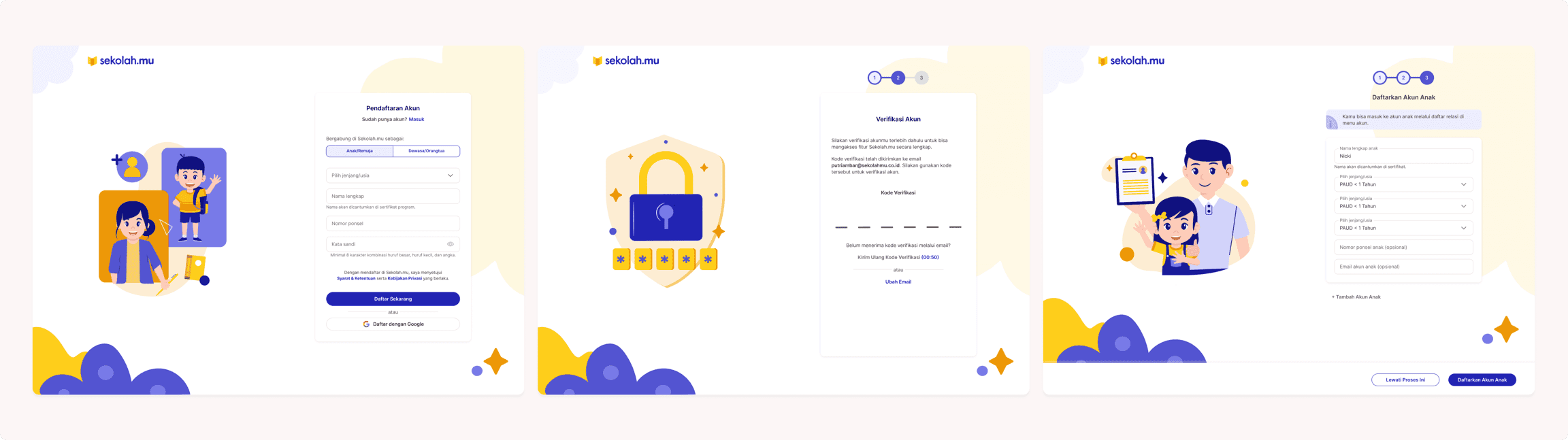
The updated registration separated Parent/Adult and Child accounts and allowed parents to add children as part of their own registration.
A parent entered their information first and could then choose whether to add a child. If they had more than one child, another account could be added within the same process rather than starting registration again from the beginning.
We also could not assume that every child had their own email address or phone number. The information we asked for therefore depended on who was being registered and what information was available for that account.

05 — New or Existing Account?
Not every child needed a new account.
Some children were already registered on Sekolah.mu, so parents needed a way to connect those accounts instead of accidentally creating another one. New child accounts, meanwhile, needed to be created and linked to the parent.
The screens could look similar, but what was happening behind them was different. One path created an account and a new parent-child relationship, while another connected two accounts that already existed.
We had to show the difference between these two paths without adding unnecessary steps for parents who were creating a new account.

06 — Working Through the Other States
We also had to consider what happened when someone stopped before completing verification, entered incorrect information, tried to connect an account that could not be found, or returned to the process in a different state.
There were limits and conditions around how accounts could be connected and managed. A change in one part of the flow could affect what someone saw or was allowed to do later.
I spent quite a lot of time checking these connections between screens and making sure the different states still worked together.

07 — After Registration
Connecting accounts during registration also affected what happened after a family logged in.
Parents needed to see the children connected to their account, move between accounts when necessary, and manage those relationships. The child side also needed to show how their account was connected to a parent.
We worked on the account-management states alongside registration, including how connected parent and child accounts would appear after logging in.

08 — Reflection
This project happened when I moved from working mainly on Payment into the combined User and Payment team. I had to become familiar with another part of Sekolah.mu quite quickly, and the number of user types made the work more complicated than I first expected.
A parent, a child with their own account, a child without their own contact information, and a parent managing several children could all move through the system differently. Designing the main flow was only one part of the work. We also had to think through the different states, relationships, errors, and what should happen when someone did not follow the expected path.
I was also working with developers who were new to the team. I spent more time explaining the flows and why certain decisions had been made, especially when a feature involved several account states.
Our responsibility as the User and Payment team continued during development. Before something moved towards staging and the actual pages, I checked the developed version against the Figma design. I looked at whether the interface and interactions were still coherent with what we had designed, discussed differences with the developers, and checked the implementation again when changes were made.
What looked like a relatively simple registration flow became much more work once we started accounting for all of these cases. I also had to understand the design well enough to follow it into development and notice when the implementation worked differently from what we had designed.